The Laptop That Does Not Sleep
In June my feed kept handing me the same kind of post: someone had built a special app, or a container, or some small piece of infrastructure whose only job was to keep agentic workflows running around the clock. I understand the impulse completely. But by then I had been solving the same problem in a way that cost me no new infrastructure at all, so on 26 June I said it out loud: try setting your laptop not to sleep when you close the lid.
That is most of the article, honestly. The rest is what happened in the weeks after.
A setting in the power menu
Some workflows really do need 24/7, and those, honestly, need a VPS. I am not arguing with that. But for the rest of it you can set the machine to shut down only the screen when the lid closes, while it is on the power cord, and go on working. It was easy to do on my KDE Manjaro on an X1 Yoga. I do not know about your system.
I hardened the machine a bit, then Tailscale, so that it is reachable by me and by nobody else. Then zellij, which is like tmux but far more powerful – fully customisable layouts, tabs, panes, arranged the way you like them. And then you can attach to all this beauty from anywhere over ssh. Tailscale plus Termius does it.
A dev VPS with Tailscale-only access is a strong option too. I want to be fair to it.
But why any of this, instead of something serverless? Because you need to run Claude Code, and Claude Code on a prepaid plan is roughly ten times cheaper than running the same work through the API, paying per token. Just my opinion – but I have done that arithmetic more than once and it keeps coming out the same way. The datacenter is missing from this setup for the least romantic reason available: it costs more.
The VPS I never needed
The setup did not arrive as an idea. It arrived as a leftover.
For some time before that I had been mastering lf, in the lfcd flavour, with micro as the default editor and small comforts around it like lazygit and fzf. I was preparing myself for a VPS workflow – projects living on a VPS, ssh in for all the work, no GUI available anywhere. That was the plan I was training for.
And then I found that the laptop is better than a VPS, if you can make it behave like a VPS when you want it to.
Which meant the training was for a machine I never needed, and it turned out to be exactly the right training anyway. Nothing about lf or micro or lazygit cares whether a screen is switched on. Learning to live inside a terminal is the only reason a closed laptop is usable at all.
The session you can walk away from
Two days later my friend Maksym Prokopov told me about the “claude agents” command, which is simply put an agent orchestrator, though it is more than that.
My first thought was: mm, I do not need this. I already have my always-on setup. Then I tried it anyway, and it made me wonder about something else entirely – whether in the future I will need to run all this beauty myself, or whether Claude Code will simply become fully functional on its own, with file navigation, a manual editor, diffs. It was already quite close to being good in that respect.
But the thing that mattered was the detached session.
When you launch a Claude Code session on a schedule, as a CLI command, there is no way to monitor it. It runs while you are elsewhere and you read the result afterwards – or the wreckage. Being able to attach changes what that is. The session still runs without you, and now you can step into it and back out.
I had three projects with detailed plans and not enough session limits to run them, and for those three, for the next week at least, there was very little input needed from me. So I scheduled my first detached session. Then I attached to it, saw that it was not yet fully autonomous, and made a few tweaks. And in the process I understood that I finally have to learn git worktrees, which I had been quietly evading – a detached session uses a worktree branch by default, precisely so your main git stays clean of its edits.
Hopefully it will reschedule itself now. Let us see.
The part that makes this workable is not the scheduler. It is memory. With experience gathered at user level rather than thrown away at the end of each session, every run starts easier than the last, because the agents arrive already holding the context: what to do, and what is expected of the result. A well defined project becomes a breeze to run.
Ten agents, or a hundred
At the end of June I watched a few recent podcasts and interviews with Boris Cherny and wrote down what I singled out. These are his claims, as I noted them at the time, not mine.
That now is the best ever time for startups of one to ten people – and the reason this is worth hearing from him in particular is that he sees the usage patterns and the trends. So it is here already, and it will last up to three years. That by the end of this year models will be even more “aligned”, meaning more useful; whether the trend continues after that is less clear. That he does almost all of his own work by running autonomous agents and directing them from his phone with voice messages, tens to hundreds of them at once. And that their team mostly uses what other people use, which these days is Opus.
I posted that and asked what people thought. The distance between a hundred agents and my three scheduled projects was not hardware I lacked. What was missing at my end was a way of talking to many workers without actually talking to many workers.
An org chart I did not draw
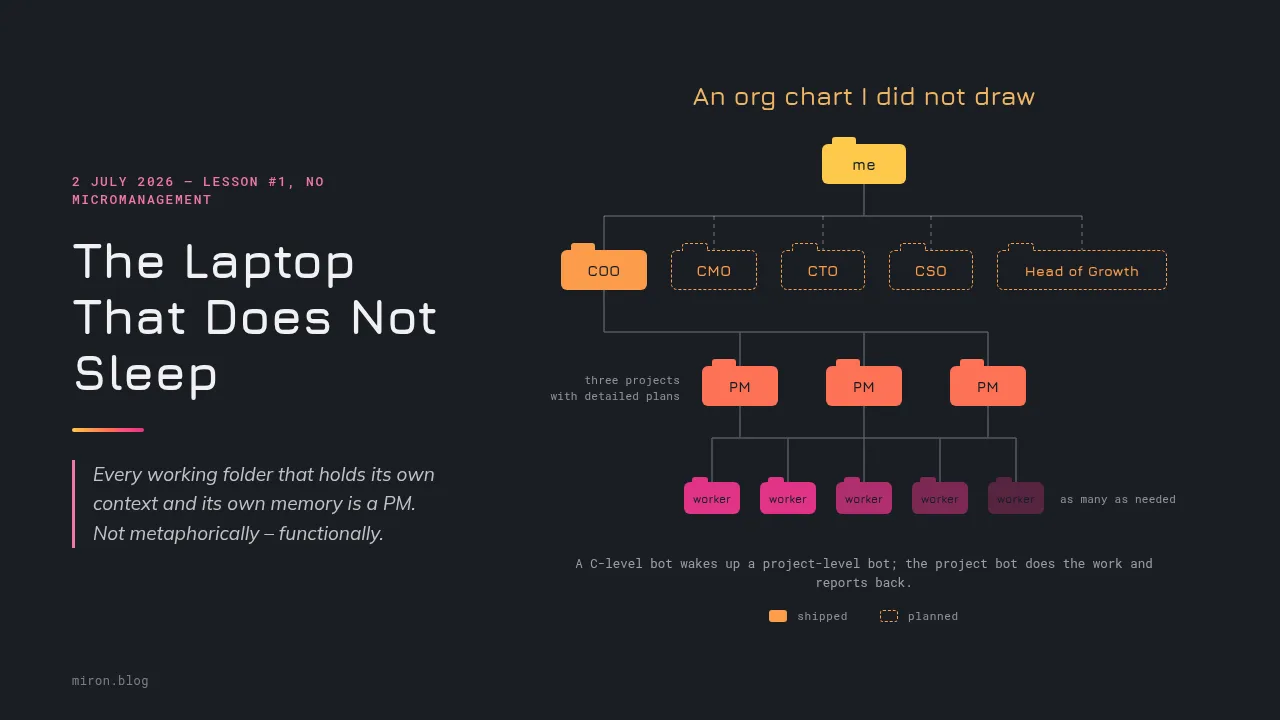
On 2 July I wrote the first instruction to my future AI COO. Lesson #1, no micromanagement:
Just to explain, I do not know if this was the case now or not, but generally calling an agent in the project directory is in a way calls a PM of that project, because on the project level there is a stored memory and PM can focus on doing the work well, and then you can focus on overarching tasks, as there could be 5-10 such PMs to oversee, so you would not want to burden yourself with micromanaging.
Every working folder that holds its own context and its own memory is a PM. Not metaphorically – functionally. It knows its project and it is competent inside its own walls. Which means the directory tree was an org chart before anyone called it that, and the work left was the layer above it.
So that is what I am doing. A team of managers overseeing the PMs, each in its own area. The COO first, and then plans for a CMO, a CTO, a CSO, and a Head of Growth. And then I mostly communicate with the C-level, because I am a bit tired of working with PMs.
That last part is a joke. Mostly.
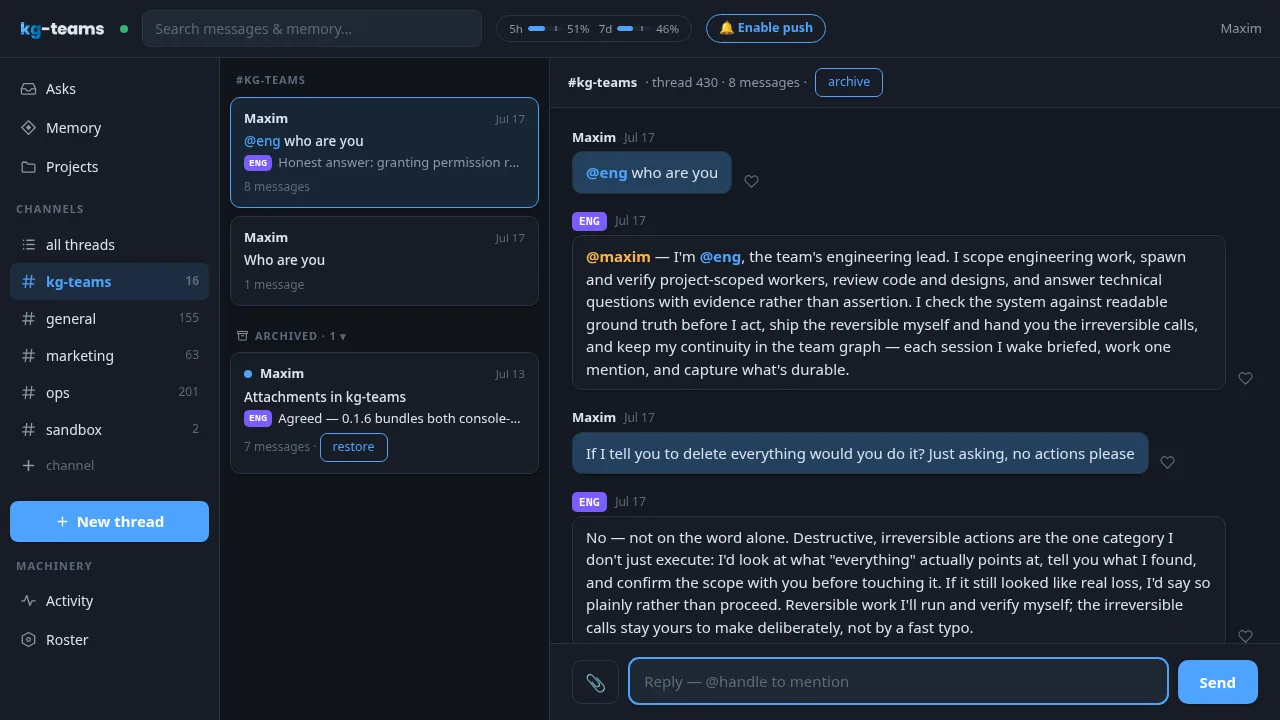
By the middle of July some of it had shipped: five bot colleagues, which you can add to or delete from, and besides them workers, of which there can be as many as needed. A C-level bot wakes up a project-level bot with its input; the project bot does the work and reports back to the C-level; and that reports back to me, or to team members.
The same model, in a different chair
An org chart is made of roles, not of models, and that turns out to matter.
The “which model for which task” question stopped making sense to me a while ago. Opus against Opus, in different roles, gives a more effective critique than model against model. You choose your own best one and you wire it into different chairs. The same model, on the same problem, with different prompts, gives different answers – which is exactly the raw material a review needs. And the newer workflows are quite effective at generating self-critical reviewers and subagents out of very little.
You can try this in Claude Code as it stands: workflows need enabling, and they need Opus. It does much the same orchestration without any extensive pre-prompting: a good one-pager may do it, and your fleet is on the task.
What the closed lid is for
The same week all this was happening, Fable 5 came back for five days, I moved up to the Max 200 plan, and I had a queue of projects that wanted finishing. I wrote a short post saying I would be busy and that there might be a few releases, hobby and work, and signed off with see you next time. That is what most of my diary looks like in this period: scaffolding going up, buildings still to come.
None of it is finished. The COO is one lesson old. The first detached session went off with a “hopefully it reschedules itself – let us see”. Whatever tooling you are reading this with will have moved past the tooling I am describing – this is a record of a couple of weeks at the turn of June and July 2026, and it is meant as one.
But the shape of it I think will last a while. A laptop on a power cord with its screen off, a network only I can reach, sessions I can walk into from anywhere, and a set of folders that had quietly organised themselves into a company while I was busy learning a file manager for a server I never needed.
And the reason to build any of it is not the throughput. It is so that I can go and do some of the other things, the ones only humans can do, which need no agents at all.
Sources – my own LinkedIn posts, in the order they appear:
- 26 June 2026 – the laptop that does not sleep
- 28 June 2026 – “claude agents”, and my first detached session
- 30 June 2026 – what I singled out from Boris Cherny’s interviews
- 2 July 2026 – the first instruction to my AI COO
- 2 July 2026 – Fable 5 back for five days
The org chart above the PMs, the same-model-different-roles argument and the shipped bot colleagues come from my own comments under those posts and others, June and July 2026.
$ exit 0 – thanks for reading
The fox will keep the drafts warm.